


Learn Chess with Dr. Wolf
4.61.93K Reviews
App Specs
- Version
- 1.55.0
- Updated On
- License
- Free
- Downloads
- 10,000,000+
- Developer
- Chess.com
- Categories
- Board
- Platform
- Android, iOS
Screenshots


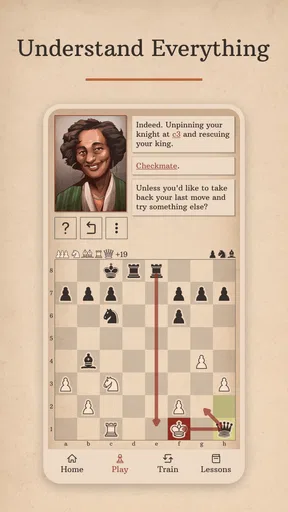
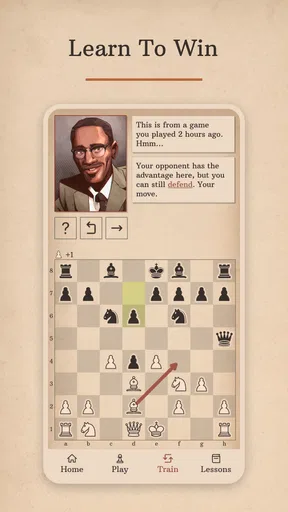
 Analysis by AppCompare
Chess can look intimidating when every piece has a different job and a single careless move can change the whole game. I like the idea of learning it through practice rather than trying to absorb a rulebook first, and that is where Learn Chess with Dr. Wolf makes its strongest impression. It is a board game from Chess.com built around guided coaching, so it feels more like a lesson with a patient teacher than a bare chessboard.
How the coaching fits into a first session
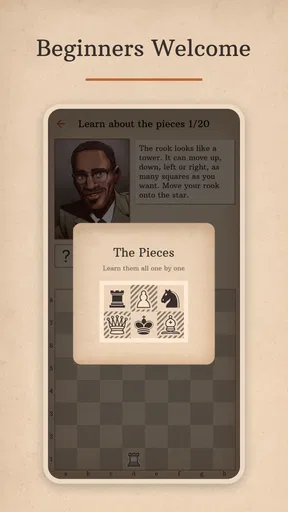
The first useful question is whether this is a place to learn the rules from scratch or a tool for someone who already plays. In my experience, it is most appealing if you know the basic moves but want help understanding why one move is safer or more purposeful than another. Beginners can still start here, though the benefit comes from taking lessons slowly and treating mistakes as part of the process, not as a score to be embarrassed by.
A practical way to use it is to open a short practice session when you have a few quiet minutes, focus on one idea, then stop before the board starts to feel like homework. That is a better fit than trying to race through lessons. Chess understanding grows when you notice a pattern and use it again, and the app’s coaching approach gives you a reason to pause over decisions instead of simply tapping through a sequence.
What a typical game can teach you
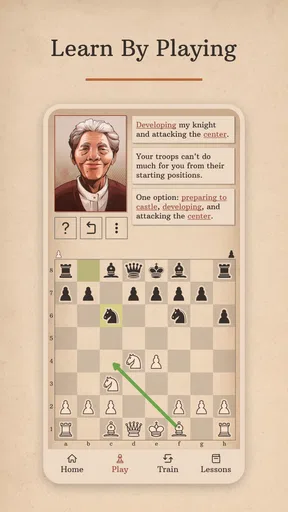
Imagine you have a spare moment after dinner and want to play without arranging a match with someone else. A game against the computer lets you test a lesson immediately, without the social pressure of making a mistake in front of an opponent. When the coach comments on a move, I would use that moment to ask myself what I expected the move to do, then compare that intention with the feedback. That small habit turns a casual game into a more useful review.
It is also worth resisting the urge to focus only on wins. A loss can point to a recurring blind spot, while a draw may show that you are defending more carefully but still need a plan to make progress. The app’s record of wins, losses, and draws can help you notice the broad shape of your practice, but the numbers alone will not explain why a game went wrong. For that, you need to remember the decision that felt difficult and revisit the idea behind it.
Where it sits among chess options
Compared with a standard chess app that mainly gets you onto a board quickly, this one puts instruction and commentary closer to the center of the experience. That is a meaningful difference for someone who often finishes a game thinking, “I don’t know what I should have done.” A general chess platform may suit you better if your main goal is to find human opponents, follow a competitive routine, or explore a broader chess community. Here, the appeal is the guided learning relationship, not a promise that every part of chess is covered in one place.
It can also complement other ways of learning. If you read a chess book or watch a lesson elsewhere, try using the app to put one idea into practice rather than expecting it to replace every resource. For example, after studying a basic opening principle, focus on whether your pieces are developing sensibly in a practice game. That keeps the app’s feedback connected to a real decision and makes short sessions more intentional.
Worth Reading Before You Choose

EA SPORTS FC Mobile 26 Is a Bigger Football Game, but It Takes Time

Flipboard Shows What News Apps Must Do Beyond the Feed

Switching to Android Auto Means Rethinking Your Driving Routine

Google Calendar Makes a Crowded Week Easier to Manage

Ludo King Makes the Most of the Minutes Between Plans

Baby Panda World Brings Quick Play to Modern Phones, but Its Game Library Feels Busy
Who is likely to enjoy it—and who may not
I would recommend it to a new player who wants encouragement while learning, or to a casual player who is tired of repeating the same mistakes without understanding them. It is especially approachable if you prefer feedback during a game to silently studying a board position. The friendly coaching style can make chess feel less like a test, which matters when you are still getting comfortable with the pieces and their possible moves.
On the other hand, experienced players who want deep opening preparation, tournament tools, or frequent games against people may find the coaching focus too narrow. Likewise, if you already know the rules and prefer to learn by analyzing positions without commentary, the guided style might interrupt your own thinking. I would choose a more competition-centered chess service for those needs and keep this one for learning fundamentals or reinforcing a particular habit.
The game is free to install, with in-app purchases ranging from $4.99 to $39.99 per item. I would start by seeing whether the teaching style suits you before spending anything. Its Everyone content rating makes it suitable for a broad audience, but that does not mean every learner will want the same pace or level of guidance. If you are choosing for a child or a family member, the useful test is whether they enjoy taking time to understand moves rather than only playing quickly.
There is no need to treat each session as a full lesson. A simple routine—one short lesson, one practice game, then a quick thought about the move you found hardest—can be more sustainable than a long session that leaves you mentally tired. If you keep making the same mistake, make that the subject of your next practice rather than jumping to a new topic. This is a small but practical way to get more value from coaching without turning chess into a daily obligation.
The main trade-off is that coaching can make practice feel more guided than open-ended. That is helpful when you need direction, but less appealing if you want to explore a position at your own pace or create your own training plan. I would also avoid assuming that a positive comment means a move is automatically best in every possible position; use feedback as a prompt to think, not as a substitute for building your own judgement. That distinction helps the app teach rather than simply tell you what to do.
For a beginner, one of the most useful questions is whether the computer opponent will make practice feel manageable. The app offers different difficulty levels and adjusts to your progress, which can help you avoid games that feel hopelessly hard or too easy to learn from. If a match becomes frustrating, step back to a lesson or choose a more comfortable challenge. The point is not to prove you can beat the computer every time; it is to make decisions you can understand and improve.
The broader chess-learning trade-off is between personalized guidance and independent exploration. A coach can draw attention to a decision you might otherwise overlook, while books, videos, or analysis tools can let you set the pace and choose the exact topic. I see this game as a useful starting point and practice companion, especially when you want a nudge at the board. It is less convincing as a single solution for someone who wants every learning method and competitive feature under one roof.
Getting Started with Your New Chess Buddy
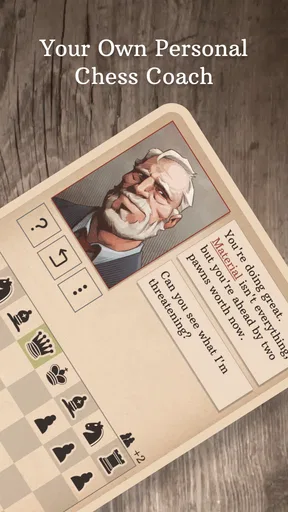
Installing Learn Chess with Dr. Wolf is a breeze. Available on both Android and iOS, it's just a quick download away from transforming you into a chess enthusiast. Once you open the app, Dr. Wolf immediately greets you with a warm introduction. He’s not just a digital instructor; he’s portrayed as a charming, wise character who’s genuinely invested in your progress.
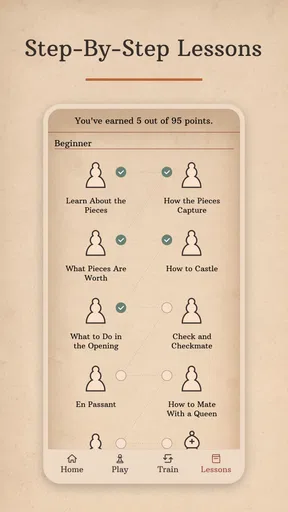
From the get-go, the app is designed to be user-friendly. You’re not just thrown into the deep end of chess strategies. Instead, Dr. Wolf gently eases you into the basics, ensuring you grasp the fundamentals before diving into more advanced tactics. It’s like having a patient teacher who never judges your mistakes but rather uses them as teaching moments.
Discovering Your Inner Chess Master
One of the coolest features of this app is its interactive lessons. Dr. Wolf offers a series of lessons that are both engaging and educational. Each lesson breaks down complex concepts into digestible pieces. Whether you’re learning openings or endgames, the app provides a hands-on approach to understanding the intricacies of chess.
What really stands out is the real-time feedback. As you play, Dr. Wolf comments on your moves, offering praise or suggesting improvements. It’s like having a chess mentor who’s available 24/7. This kind of immediate feedback is invaluable for beginners and those looking to hone their skills.
Practice Makes Perfect
Beyond lessons, Learn Chess with Dr. Wolf allows you to play games against the AI at various difficulty levels. This means you can practice what you’ve learned in lessons without the pressure of human opponents. The AI is flexible, adjusting its difficulty based on your progress, ensuring you’re always challenged but never overwhelmed.
Furthermore, the app tracks your progress meticulously. It logs your victories, losses, and draws, providing a comprehensive overview of your development. This feature is great for setting personal goals and witnessing your improvement over time.
A Friendly and Inviting Design
The app’s design deserves a special mention. It boasts a clean, intuitive interface that’s easy on the eyes. Each feature is just a tap away, and the overall aesthetic is inviting. It’s almost as if the app is saying, "Come on in, let’s play some chess!"
Moreover, the animations are smooth, and the sound effects are subtle yet satisfying. Each move feels deliberate and meaningful, enhancing the overall experience. It's these little touches that make learning chess enjoyable rather than a chore.
Why Choose Dr. Wolf?
If you’re still on the fence about downloading this app, consider this: Learn Chess with Dr. Wolf is not just about learning chess; it’s about enjoying the journey. The app transforms what could be a daunting task into an adventure of discovery and mastery. Dr. Wolf’s personal touch makes you feel like you’re not alone on this journey, which is something you rarely find in educational apps.
Another noteworthy aspect is the community. While the app itself doesn't have a direct social feature, it encourages you to connect with fellow learners and chess enthusiasts outside the app. Sharing strategies and discussing lessons with others can further enrich your learning experience.
Speed, stability, and device fit
For this kind of chess game, I would judge speed less by flashy effects and more by whether a lesson or move lets me keep my attention on the position. The interface is described as clean, and the move animations as smooth, which suits a coaching app: visual polish should support clarity rather than distract from the board. I would still approach it as a focused learning tool, not a game designed around fast action.
Chess sessions can become more demanding in a different way when you move from a short lesson into several practice games. The main strain is usually mental: you are tracking threats, considering alternatives, and trying to absorb feedback at the same time. I find it useful to pause after a confusing suggestion and work out what changed on the board before continuing. That keeps commentary from becoming background noise and makes a longer session feel purposeful.
For everyday reliability, the most reassuring part of the design is that its core loop is straightforward: learn an idea, try it in a game, and reflect on the result. If you lose focus, returning to a single lesson or an easier practice level is a sensible reset. I would not treat a run of wins or losses as proof that the app is working or failing; chess outcomes vary, and progress is better judged by whether you recognize more useful choices over time.
The game supports Android devices running version 5.0 or later, and its current release is version 1.52.1. That gives Android users a clear baseline to check before installing. On any device, a larger screen can make it easier to see the board and move comfortably, while a smaller phone is convenient for a quick lesson between other tasks. I would choose a quiet moment and a screen position that lets you study the whole board, especially when learning how pieces interact.
Chess.com is the developer behind the game, which has an average rating of 4.6 from around 72,000 ratings and more than 5 million installs. It was released on May 9, 2020, and has around 1,900 written reviews. Those figures suggest that many players have tried it, but they cannot tell you whether its particular teaching style will click for you. The best test is still whether you enjoy pausing to understand a move rather than immediately starting another game.
Making coaching useful without overdoing it
One small adjustment I recommend is to decide what you want from a session before opening the board. You might be working on not leaving a piece undefended, or simply trying to develop your pieces before launching an attack. Keeping one question in mind makes the coach’s comments easier to connect to your own choices. It also prevents the common beginner habit of collecting bits of advice without knowing when to apply them.
If you are returning after a break, do not assume you need to start from the beginning or play several games to get back into it. A brief lesson can refresh a concept, and a single practice game can show whether it feels familiar. Conversely, if a lesson seems too basic, move toward playing and use feedback to identify the gaps that still matter. The value is in matching the activity to your current confidence, not in following a rigid routine.
Final Thoughts
In conclusion, Learn Chess with Dr. Wolf is a fantastic choice for anyone looking to dive into the world of chess. Whether you’re a complete novice or someone looking to brush up on your skills, this app offers a comprehensive, enjoyable, and effective approach to learning chess. So why wait? Download it now and start your journey towards becoming a chess master. Trust me, you won’t regret it!
Pros
- Interactive lessons enhance learning
- AI adapts to skill level effectively
- Friendly and encouraging AI coach
- Wide range of puzzles and challenges
- Offline play available for convenience
Cons
- Limited free content available
- Occasional AI errors in analysis
- Subscription required for full access
- No multiplayer mode for live games
- Graphics are basic and unexciting
FAQs for Learn Chess with Dr. Wolf
What features does Learn Chess with Dr. Wolf offer to improve my chess skills?
Learn Chess with Dr. Wolf offers a comprehensive tutorial experience, focusing on personalized coaching. The app provides interactive lessons, targeted exercises, and real-time feedback. Dr. Wolf, the virtual coach, adapts to your skill level, helping you understand mistakes and offering strategic advice to enhance your gameplay.
Is Learn Chess with Dr. Wolf suitable for beginners?
Yes, Learn Chess with Dr. Wolf is designed with beginners in mind. The app provides step-by-step lessons, starting with the basics of chess, including piece movements and fundamental strategies. Dr. Wolf’s guidance is patient and methodical, making it an excellent choice for those new to the game.
Does the app require an internet connection to function?
Learn Chess with Dr. Wolf primarily requires an internet connection to access its full range of features, including updates and community interactions. However, some lessons and practice modes may be available offline. Check the app’s settings to see which features are accessible without connectivity.
Are there any in-app purchases or subscription fees?
While Learn Chess with Dr. Wolf is free to download, it offers in-app purchases and subscription options. These purchases provide access to advanced lessons, additional features, and ad-free experiences. Users can decide if they wish to unlock these enhancements based on their learning preferences.
How does Dr. Wolf personalize the learning experience?
Dr. Wolf personalizes the learning experience by analyzing your gameplay and identifying areas for improvement. The app tailors lessons and exercises to your skill level, ensuring each session addresses your specific needs. This adaptive approach helps accelerate learning and builds confidence in your abilities.


